Snowflake has a unique architecture and features for storing, processing, and analyzing data. Unlike traditional databases, Snowflake does not let users create indexes on tables or columns because it automatically partitions and organizes data into micro-partitions. Snowflake uses metadata, statistics, and pruning techniques to optimize query performance and eliminate the need for manual indexing. But, for very large tables where the natural clustering of the data is not optimal or has degraded over time, Snowflake allows users to define a clustering key for the table.
In this article, we will provide an overview of how Snowflake optimizes queries using clustering keys as an alternative to indexes. We will cover best practices for leveraging clustering to improve performance.
How Snowflake Handles Indexing?
Traditional database indexes create pointer structures to efficiently access sorted data on disk. This allows for quickly filtering rows and speeding up queries.
But, in Snowflake, data is stored across distributed storage systems. Query optimization requires different techniques.
Snowflake adapts its query execution plans automatically based on comprehensive query history and table statistics. It also utilizes both micro-partitioning and clustering keys to optimize large Snowflake tables as well as queries.
Now, let's quickly go over some of the techniques that Snowflake utilizes for efficient query optimization.
Save up to 30% on your Snowflake spend in a few minutes!


Snowflake Micro-Partitioning
Snowflake stores data in small chunks called micro-partitions. Snowflake makes these micro-partitions automatically when you load data into it and are designed to optimize query performance and storage efficiency.
Each micro-partition in Snowflake contains a specific range of rows and is organized in a columnar format. Typically ranging in size from 50 MB to 500 MB of uncompressed data, these micro-partitions enable parallel processing and selective scanning of only the relevant data during query execution.
Check out this article, where we covered all you need to know about Snowflake micro-partitions.
Snowflake Pruning
Pruning is a technique that Snowflake uses to reduce the amount of data that needs to be scanned for a query. So by using the metadata of the micro-partitions and the filtering predicates of the query, Snowflake can skip over the micro-partitions that do not contain any relevant data for the query. This improves the query performance and reduces the resource consumption. Pruning happens automatically in Snowflake, and does not require any user intervention.
Snowflake Clustering
Clustering is a technique that Snowflake uses to improve the data distribution and order within a table. Clustering involves grouping similar rows together in the same micro-partitions, based on one or more columns or expressions that are specified as the clustering key for the table. A table with a clustering key defined is considered to be a clustered table. Clustering can improve query performance by increasing pruning efficiency, as well as column compression and encoding.
Snowflake Clustering Keys
A clustering key is a subset of columns or expressions in a table that are used to determine the clustering of the table. A clustering key can be defined at table creation using the CREATE TABLE command, or afterward using the ALTER TABLE command. The clustering key can also be modified or dropped at any time. Clustering keys are not intended for all tables, as they incur some costs for initially clustering the data and maintaining the clustering over time.
Remember that clustering keys are optimal when either:
- You require the fastest possible response times, regardless of cost.
- Your improved query performance offsets the credits required to cluster and maintain the table.
Some general indicators that can help you decide whether to define a clustering key for a table are:
- Queries on the table are running slower than expected or have noticeably degraded over time.
- The clustering depth for the table is large, meaning that many micro-partitions need to be scanned for a query.
How Does Snowflake Clustering Work?
Snowflake uses an automatic clustering service to cluster and re-cluster the data in a table based on the clustering key. The automatic clustering service runs in the background and does not interfere with the normal operations of the table. The automatic clustering service monitors the data changes and the query patterns on the table and determines the optimal time and frequency to cluster the table. The automatic clustering service also balances the clustering benefits with the clustering costs and avoids unnecessary or excessive clustering operations.
How to Create Snowflake Index with Clustering Keys?
To create Snowflake index with clustering key for a table, you can use the CLUSTER BY clause in the CREATE TABLE or ALTER TABLE commands. For example, to create a table with a clustering key on the id and date columns, you can use the following command:
CREATE TABLE events (
  id INT,
  name VARCHAR,
  date DATE,
  location VARCHAR
) CLUSTER BY (id);
Snowflake indexing example
To modify or drop the clustering key for a table, you can use the ALTER TABLE command with the CLUSTER BY or DROP CLUSTERING KEY clauses. For example, to change the clustering key for the events table to only use the date column, you can use the following command:
ALTER TABLE events CLUSTER BY (date);Snowflake indexing example
To drop the clustering key for the events table, you can use the following command:
ALTER TABLE events DROP CLUSTERING KEYSnowflake indexing example
How Clustering Keys Optimize Query Performance?
Clustering keys can optimize query performance by increasing the pruning efficiency and the column compression of the table. For example, suppose you have a query that filters the events table by the date column, such as:
SELECT * FROM events WHERE date = '2023-12-07';Snowflake indexing example
If the events table is clustered by the date column, Snowflake can use the metadata of the micro-partitions to quickly identify and scan only the micro-partitions that contain the matching date value, and skip the rest, which reduces the amount of data that needs to be read and processed—and improves the query performance.
Also, if the events table is clustered by the date column, Snowflake can compress and encode the column more efficiently, as the values in each micro-partition are more likely to be similar or identical. This reduces the storage space and the memory usage of the table and also improves query performance.
Step-by-step process to Create Snowflake Index using Clustering Keys
Let's walk through a simple example to create Snowflake index using cluster keys...
Snowflake Indexing Example 1—Clustering a Single Column
CREATE TABLE customers (
    id INTEGER,
    state STRING,
    name STRING
);

-- Load customer sample data
INSERT INTO customers VALUES
    (1, 'California', 'John'),
    (2, 'Texas', 'Mike'),
    (3, 'Florida', 'Sara'),
    (4, 'California', 'Jessica'),
    (5, 'New York', 'Chris');

ALTER TABLE customers
CLUSTER BY (state);

SELECT * FROM customers;
Snowflake indexing example
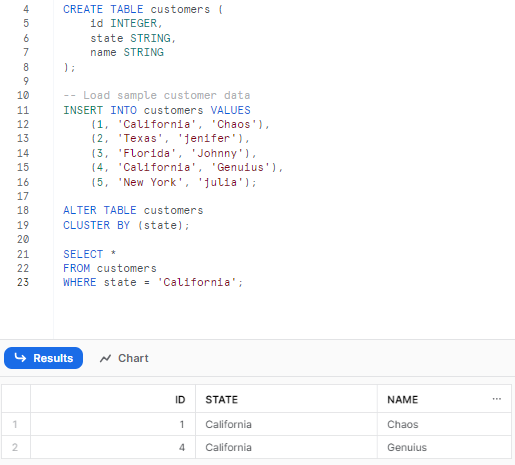
As you can see, here we cluster the customers table based on the state column. This reorganizes the storage structure to put rows from the same state next to each other. State filters can now be applied efficiently:
Snowflake Indexing Example 2—Clustering Multiple Columns
ALTER TABLE customers
CLUSTER BY (state, name);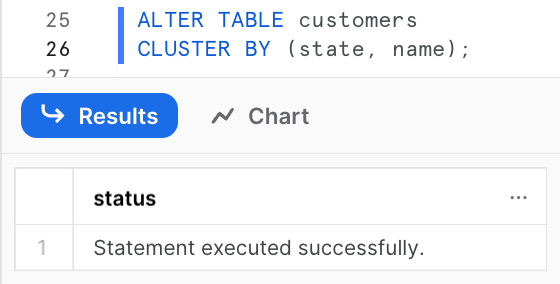
Now data will be stored ordered by state then name. Any queries filtering on state or name can benefit from reduced scans from clustering:
SELECT *
FROM customers
WHERE state = 'California'
AND name LIKE 'C%';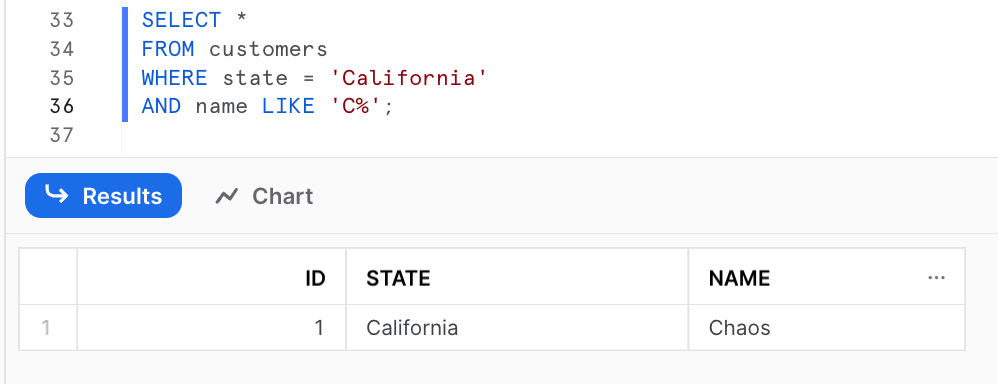
Best Practices, Use Cases, and Considerations for Clustering
Properly leveraging clustering can provide significant performance gains for targeted large queries in Snowflake. Here are some best practices:
1) Choose Columns Frequently Filtered and Joined
Cluster keys should be columns commonly referenced in WHERE clauses, JOIN predicates, GROUP BY, etc. This ensures storage alignment with queries.
2) Pick Columns with Enough Cardinality
Columns must have enough distinct values to enable pruning during scans but not too many that ranges become ineffective. Expressions can help.
3) Coordinate with Distribution Keys
Matching cluster and distribution keys allow optimization across both physical storage sorting and parallel concurrency.
4) Monitor Clustering Over Time
As data changes, monitor clustering depth and query speeds. Re-cluster tables if efficiency declines substantially.
Use Cases Where Snowflake Clustering Excels
Clustering keys provide the most benefit for:
- Fact tables with time-series data clustered on date columns
- Slowly changing dimension tables filtered on natural keys
- Large tables with defined access patterns
- Large datasets that are frequently queried and where you want to improve query performance
- Tables that are queried frequently and updated infrequently
- Tables with specific fields that are often filtered on or grouped by in queries
Considerations and Limitations
Clustering should be applied very carefully:
- Additional storage required for each clustered column
- Only one cluster key allowed per table
- Re-clustering requires significant resources
- Frequent DML operations degrade clustering over time
Understanding Clustering Depth and Automatic Reclustering
What is Clustering Depth?
Clustering depth is a critical metric that measures the average depth of overlapping micro-partitions for specified columns in a table. It provides insight into how well-clustered your data is and directly impacts query performance. The clustering depth is calculated using the SYSTEM$CLUSTERING_DEPTH function or by querying the AUTOMATIC_CLUSTERING_HISTORY view.
Clustering depth represents the average number of micro-partitions that would need to be scanned for a given value or range of values in the clustering key columns. A lower clustering depth indicates better clustering and more efficient pruning.
Calculating Clustering Depth
-- Check clustering depth for a table
SELECT SYSTEM$CLUSTERING_DEPTH('database_name.schema_name.table_name', '(column1, column2)');

-- Alternative method using SYSTEM$CLUSTERING_INFORMATION
SELECT SYSTEM$CLUSTERING_INFORMATION('database_name.schema_name.table_name');
The clustering depth value interpretation:
- 0-4: Excellently clustered, minimal improvement needed
- 5-15: Well-clustered, acceptable for most workloads
- 16-50: Moderately clustered, may benefit from reclustering
- 50+: Poorly clustered, reclustering strongly recommended
What is Automatic Reclustering?
Snowflake's Automatic Reclustering service operates as a serverless background process that continuously monitors and maintains clustering quality. Here's how it works technically:
Trigger Conditions: Automatic Reclustering is triggered when:
- DML operations (INSERT, UPDATE, DELETE, MERGE) introduce new data that doesn't align with the existing clustering
- The clustering depth exceeds internal thresholds specific to table size and access patterns
- The cost-benefit analysis determines that reclustering will improve query performance sufficiently to justify the compute credits
Reclustering Process:
- Evaluation Phase: The service analyzes table metadata, including micro-partition ranges, clustering key distribution, and recent query patterns
- Selection Phase: Identifies micro-partitions with poor clustering (high overlap or out-of-order data)
- Reorganization Phase: Reads data from selected micro-partitions, sorts it according to the clustering key specification, and writes it back as newly organized micro-partitions
- Metadata Update: Updates the table's metadata layer to reflect the new micro-partition structure
Note:
- Reclustering operates on a subset of micro-partitions at a time, not the entire table
- The service uses the same compute resources as standard queries, consuming credits from your account
- Reclustering respects Time Travel and Fail-safe retention, preserving historical micro-partitions
- The process is incremental and designed to minimize impact on concurrent queries=
Monitoring Automatic Reclustering
You can monitor reclustering activity and costs using the AUTOMATIC_CLUSTERING_HISTORY view:
-- View reclustering history for the last 7 days

SELECT
    start_time,
    end_time,
    table_name,
    credits_used,
    num_bytes_reclustered,
    num_rows_reclustered
FROM snowflake.account_usage.automatic_clustering_history
WHERE start_time >= DATEADD(day, -7, CURRENT_TIMESTAMP())
ORDER BY start_time DESC;
When to Suspend Reclustering:
- During large batch loading operations to avoid concurrent reclustering overhead
- When testing different clustering key configurations
- To control costs during periods of high DML activity
- For tables with temporary high-churn periods
Advanced Clustering Scenarios
Scenario 1—High-Frequency Ingestion with Real-Time Queries
For tables receiving continuous data ingestion (streaming, frequent micro-batches):
- Use DATE_TRUNC or bucketing expressions to reduce clustering fragmentation
- Suspend automatic reclustering during peak ingestion periods
- Schedule manual reclustering during off-peak hours using tasks
-- Create a scheduled reclustering task

CREATE OR REPLACE TASK recluster_large_table
    WAREHOUSE = maintenance_wh
    SCHEDULE = 'USING CRON 0 1 * * * ....'
AS
    ALTER TABLE large_table RECLUSTER;
Scenario 2—Tables with Skewed Data Distribution
When data distribution is highly skewed (80% of queries target 20% of data):
- Cluster on the columns that identify the frequently accessed subset
- Monitor clustering depth separately for hot and cold data ranges
- Consider table partitioning strategies for extreme skew
Scenario 3—Multi-Tenant Tables
For tables serving multiple tenants or customers:
- Cluster by tenant_id as the first column if queries are tenant-specific
- Be very aware that single-tenant queries will see excellent pruning, but cross-tenant queries won't benefit
ALTER TABLE multi_tenant_data
CLUSTER BY (tenant_id, created_date);
Troubleshooting Poor Clustering Performance
If clustering isn't improving query performance as expected:
1) Verify Query Patterns Align with Clustering Key
Use QUERY_HISTORY to confirm queries actually filter on clustering key columns
2) Check Clustering Depth Regularly
Persistent high clustering depth indicates the key may not match data distribution
3) Analyze Micro-Partition Overlap
High overlap suggests too much cardinality or poor key selection
4) Review DML Patterns
Frequent updates to clustered columns cause rapid clustering degradation
5) Consider Alternative Optimization
Search optimization service may be more appropriate for high-cardinality lookups
Snowflake Clustering vs Search Optimization Service
Snowflake also offers a Search Optimization Service for different use cases:
Use Clustering When:
- Queries filter on low-to-moderate cardinality columns
- Query patterns are predictable and consistent
- Range scans and aggregations are common
- Time-series or sequential access patterns exist
Use Search Optimization When:
- Queries perform point lookups on high-cardinality columns
- Query patterns are unpredictable or highly varied
- Equality predicates dominate (WHERE col = 'value')
- Selective filters target rare values
Clustering reorganizes physical storage, while Search Optimization creates supplementary data structures (similar to indexes) without changing micro-partition organization. Both can be used together on the same table for comprehensive optimization.
Check out the article below to learn more about the in-depth differences between Snowflake clustering and Snowflake Search Optimization Service.
 Pramit Marattha

Want to take Chaos Genius for a spin?
It takes less than 5 minutes.

Conclusion
Snowflake does not support indexing. Instead, it utilizes clustering keys to optimize query performance. Behind the scenes, clustering reorganizes the physical storage of tables by grouping together rows with similar values in specified columns, which enhances pruning during queries and skips scanning irrelevant data.
In this article, we covered:
- How Snowflake handles optimization without traditional indexing
- Techniques like micro-partitioning, pruning, and clustering
- What clustering keys are and how they physically reorganize data
- Steps to add clustering keys to tables
- Best Practices, Use Cases—and Considerations for Clustering
Just as a librarian organizes books by common attributes so people can easily find what they need, Snowflake clustering restructures table storage based on columns commonly filtered in queries, which results in faster lookups and scans for targeted use cases.
FAQs
What is Snowflake's alternative to indexes for optimization?
Snowflake utilizes clustering keys instead of traditional database indexes.
What is pruning in Snowflake?
An automatic optimization technique to skip scanning micro-partitions irrelevant to a query.
What determines pruning efficiency?
The metadata of micro-partitions and filtering predicates in queries.
What is a clustering key in Snowflake?
One or more columns used to determine data order within a table's micro-partitions.
When should you define a clustering key?
When queries on large tables degrade over time or have suboptimal performance.
Does a clustering key reorganize data physically?
Yes, it groups related data values together into micro-partitions.
How does a clustering key improve performance?
By increasing pruning efficiency and compression potential.
Can you create multiple clustering keys per table?
No. Only one clustering key is allowed per table.
Does defining a clustering key impact DML operations?
It can degrade clustering over time requiring re-clustering.
When is clustering most impactful?
For frequently filtered columns in large tables, especially fact tables.
If clustering is so beneficial, why not cluster every table?
It requires compute resources and storage overhead.
Does clustering align with distribution keys?
Yes, matching clustering and distribution can fully optimize scans.
What SQL adds a clustering key to an existing table?
To add a clustering key to an existing table, use this command:ALTER TABLE ... CLUSTER BY
Are indexes fully replaced by clustering in Snowflake?
Yes, clustering eliminates the need for indexes by restructuring data.
Does clustering happen instantly?
No, an automatic background service handles clustering and re-clustering.
Can DML operations occur during clustering?
Yes, normal DML is supported during clustering.
Is monitoring efficiency important after clustering a table?
Yes, degradation can occur requiring re-optimization.
What SQL removes an existing clustering key?
To remove a clustering key from an existing table, use this command:ALTER TABLE ... DROP CLUSTERING KEY
Does Snowflake allow indexing?
No. Snowflake does not support traditional indexing. Instead, it uses clustering keys to optimize query performance.