
Data partitioning is a common concept used in data warehousing and is essentially the separation of large datasets into smaller, distinct chunks, which allows for easier data management, reduced data storage costs, and more efficient access to certain areas or subsets within the overall dataset.
Snowflake micro-partitions are contiguous units of data storage that Snowflake uses to automatically store data in by default. Unlike traditional RDBMSs, Snowflake divides tables into exponentially smaller partitions, allowing for faster query runtimes without having to manage massive chunks of data.
In this article, we will do a deep dive on explorations of what these Snowflake micro-partitions are, how they work, and their importance and benefits.
What is Data partitioning?
Partitioning is the process of breaking down a table into smaller, more manageable parts based on a set of criteria, for example, a date, a geographic region, or a product category. Each partition is treated as a separate table and can be queried independently, allowing faster and more efficient data retrieval. Also, keep in mind that partitioning can help lower storage costs by putting data that is used less often in cheaper storage space.
Let's consider an example to illustrate the benefits of data partitioning. Let's say, for example, that we have a sales database containing millions of records organized into year and month partitions so that data from specific months or years can be promptly accessed. Therefore, by partitioning the data like this, requests are more efficiently processed and more accurate answers can be obtained.
SELECT store_location, SUM(sales_amount)
FROM sales
WHERE transaction_date BETWEEN '2023-01-01' AND '2023-12-31'
AND product_category = 'Electronics'
GROUP BY store_location
Assume that the sales table is partitioned on the transaction_date and store_location columns. The warehouse can prune the partitions only to scan those containing data within a certain time frame or within a particular store location. This way, the number of records it needs to scan is significantly reduced, resulting in faster query times.
Now, hold on! So, what exactly is partition pruning?
Partitioning can also help to improve query performance through the process called “partition pruning”.
Partition pruning is the process of eliminating any partitions that do not contain the necessary information based on query criteria in order to reduce time and resource utilization, particularly for queries involving massive amounts of data.

Want to take Chaos Genius for a spin?
It takes less than 5 minutes.

What are Snowflake Micro-Partitions?
Snowflake micro-partitions are contiguous units of data storage that Snowflake automatically stores data in by default. Whenever data is loaded into Snowflake tables, it automatically divides them into these micro-partitions, each containing between 50 MB to 500 MB of uncompressed data. Each micro-partition corresponds to a group of rows and is arranged in a columnar format.
Tables in traditional warehouses usually have a limited number of partitions, However, Snowflake’s micro-partitions’ structure allows for extremely granular pruning of very large tables, which can be comprised of millions, or even hundreds of millions, of micro-partitions.
Snowflake stores metadata about all rows stored in a micro-partition, including:
- The range of values for each of the columns in the micro-partition.
- The number of distinct values.
- Additional properties used for both optimization and efficient query processing.
Learn more about it from the official Snowflake documentation.
What do Snowflake micro-partitions look like?
Let's delve a bit deeper into the rabbit hole of Snowflake micro-partitions.
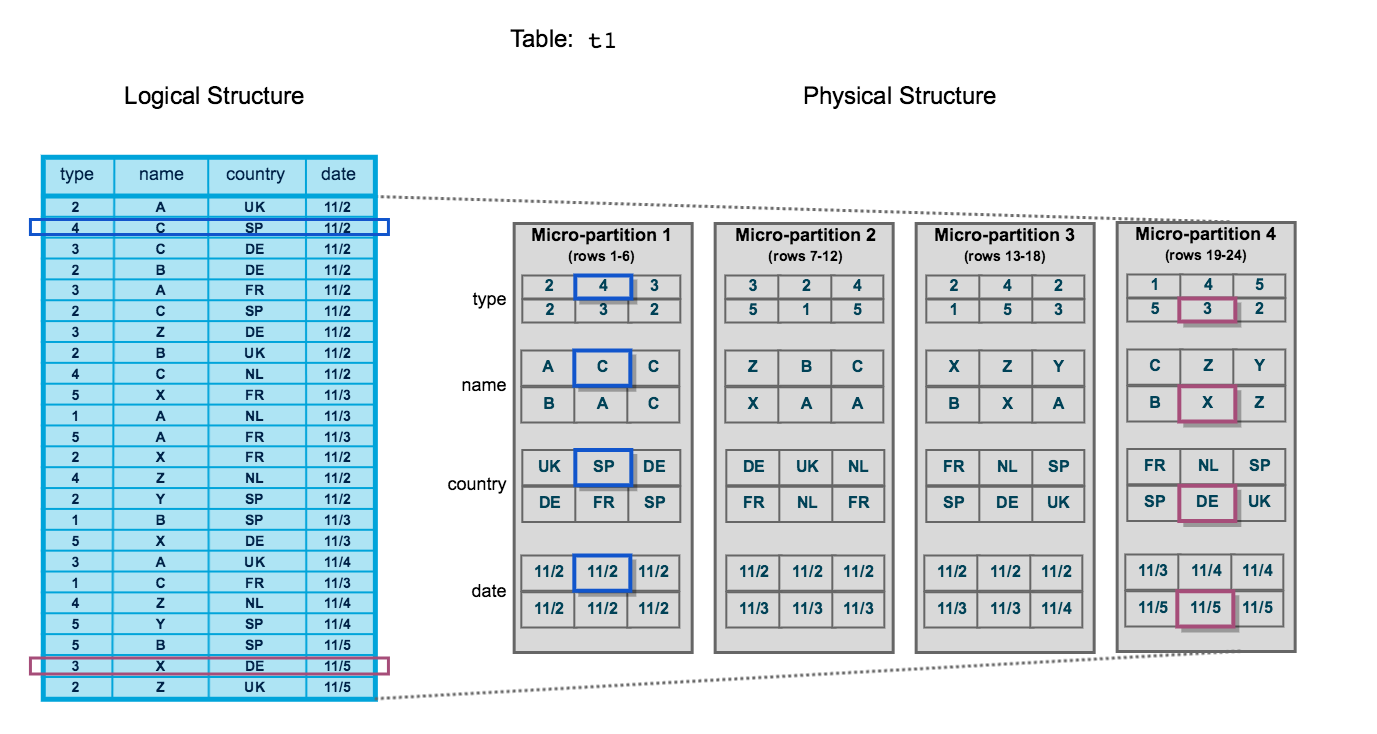
As shown in the image above, the table content on Snowflake is displayed on the left side as the logical structure, and the physical structure on the left side, which consists of four micro-partitions. Each partition can contain upto 50 to 500 MB of uncompressed data. As you can see, there are 24 rows of data in the table, including columns for type, name, country, and date. Also, two specific rows, the second and twenty-third, are highlighted. On the right-hand side, the physical structure of the table is displayed. Snowflake splits the table into four separate micro-partitions, each containing six rows of data. The first micro-partition includes data rows from 1 through 6, while the others contain data rows from 7 to 12, 13 to 18, and 19 to 24, respectively.
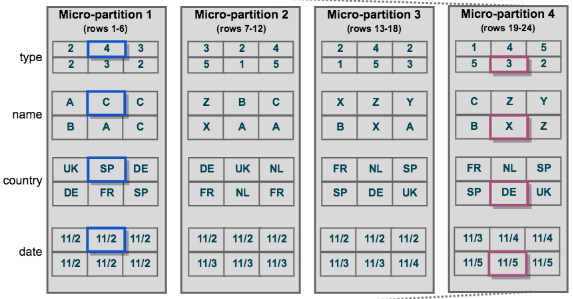
The data in the table is stored by column, not by row, which is then transposed into the multiple micro-partitions. So whenever you are searching for a specific record, the Snowflake identifies the record from the relevant partitions, queries only those partitions as needed, and retrieves it from the micro-partitions.
How many micro-partitions does Snowflake create?
Snowflake can create thousands or even millions of micro-partitions for a very large table. For every new arrival of data chunks, it does not modify the old micro-partitions because they are all immutable by nature, and hence it adds more and more micro-partitions as new data arrives.
Benefits of Snowflake Micro-Partitions
The benefits of Snowflake's approach to partitioning table data include:
- Automatic partitioning requires virtually no user oversight
- Snowflake Micro-partitions are small, allowing for efficient DML operations
- Micro-partition metadata enables "zero-copy cloning", allowing for efficient copying of tables, schemas, and databases with no extra storage costs
- Original micro-partitions remain immutable, ensuring data integrity when editing data in a Snowflake zero-copy clone
- Snowflake Micro-partitions improve query performance through horizontal and vertical query pruning, scanning only the needed micro-partitions for better query performance
- Clustering metadata is recorded for each micro-partition, allowing Snowflake to further optimize query performance
Advanced Clustering and Optimization Strategies
Understanding Natural Clustering vs Clustering Keys
When data is initially loaded into Snowflake tables, the micro-partitions are created in the order the data arrives, a phenomenon known as natural clustering. Data stored in tables is typically sorted along natural dimensions such as date or geographic regions, which means if you load sales data chronologically, the micro-partitions will naturally group data by time periods.
However, natural clustering can degrade over time due to DML operations (INSERT, UPDATE, DELETE, MERGE) or data loading patterns. For example, loading data using Snowpipe tends to disrupt natural data clustering, which can lead to poor query performance. When natural clustering degrades, explicitly defining a clustering key becomes beneficial.
So, What are Clustering Keys?
A clustering key is a subset of columns in a table that are used to co-locate the data in the table in the same micro-partition. When you define a clustering key, Snowflake reorganizes the data within micro-partitions so that rows with similar values are physically stored together. This improves query performance by enabling more efficient partition pruning.
Clustering Key Syntax:
CREATE TABLE sales_data (
    transaction_date DATE,
    store_location VARCHAR(100),
    product_category VARCHAR(50),
    sales_amount DECIMAL(10,2)
) CLUSTER BY (transaction_date, store_location);

ALTER TABLE sales_data CLUSTER BY (transaction_date, product_category);

-- Drop clustering key
ALTER TABLE sales_data DROP CLUSTERING KEY;
When Should You Use Clustering Keys?
Clustering keys are not intended for all tables due to the costs of initially clustering the data and maintaining the clustering. Use clustering keys when your table meets all of the following criteria:
- Large Table Size: The table contains at least 1,000 micro-partitions, indicating it holds multiple terabytes of data
- Query Benefits: Queries are either highly selective (reading only a small percentage of rows) or require sorted data (using ORDER BY clauses)
- Low Update Frequency: The table is queried frequently but updated infrequently, as frequent updates disrupt clustering and trigger costly reclustering
- Common Filter Patterns: Queries consistently filter or join on the same columns
Measuring Clustering Quality
Snowflake provides system functions to assess how well your tables are clustered:
SYSTEM$CLUSTERING_DEPTH
This function computes the average depth of the table according to the specified columns or the clustering key defined for the table. The average depth measures how many overlapping micro-partitions exist for given column values.
-- Check clustering depth using defined clustering key
SELECT SYSTEM$CLUSTERING_DEPTH('sales_data');

-- Check clustering depth for specific columns
SELECT SYSTEM$CLUSTERING_DEPTH('sales_data', '(transaction_date, store_location)');
The smaller the average depth, the better clustered the table is with regards to the specified columns. A clustering depth close to 1.0 indicates optimal clustering, while values above 4-5 suggest the table may benefit from reclustering or a different clustering key.
SYSTEM$CLUSTERING_INFORMATION
This function provides comprehensive clustering metadata in JSON format:
SELECT SYSTEM$CLUSTERING_INFORMATION('sales_data', '(transaction_date)');Output includes:
total_partition_count: Total number of micro-partitionsaverage_overlaps: Average number of overlapping micro-partitions per partitionaverage_depth: Average overlap depth (higher values indicate poor clustering)partition_depth_histogram: Distribution of overlap depths across all micro-partitions
Unless you have at least 1,000 micro-partitions, you shouldn't be concerned with clustering, as the performance gains on smaller tables rarely justify the clustering costs.
Choosing Effective Clustering Keys
Here are some of the best practices for Selecting Clustering Keys:
1) Prioritize WHERE Clause Columns: Choose columns that appear frequently in query filter conditions with equality or range comparisons
2) Consider Cardinality: For VARCHAR columns, Snowflake considers only the first 5 bytes when clustering, so high-cardinality string columns may not cluster effectively
3) Limit Key Complexity: Snowflake recommends using 3-4 columns maximum per clustering key, as additional columns increase costs more than benefits
4) Avoid Transformations: Wrapping columns with functions leads to poor query performance as Snowflake cannot fully eliminate partitions
5) Column Order Matters: If you define two or more columns as the clustering key, the order has an impact on how the data is clustered in micro-partitions
Example of Poor Clustering Key Choice:
- AVOID: Using functions in WHERE clause that don't match clustering key
SELECT * FROM sales_data
WHERE TO_VARCHAR(transaction_date) = '2024-01-15'; -- Prevents partition pruning- BETTER: Direct comparison matching clustering key
SELECT * FROM sales_data
WHERE transaction_date = '2024-01-15';  -- Enables partition pruning
Automatic Clustering
Snowflake's Automatic Clustering service seamlessly and continuously manages all reclustering operations for clustered tables, eliminating the need for manual monitoring and maintenance.
How Automatic Clustering Works:
- Snowflake monitors the clustering quality of tables with defined clustering keys
- When clustering degrades below optimal levels, Snowflake automatically initiates reclustering
- New micro-partitions are generated based on the clustering key, while original micro-partitions are marked as deleted but retained for Time Travel and Fail-safe
- The process is transparent and does not block DML statements
Controlling Automatic Clustering:
- Suspend automatic clustering (stops credit consumption)
ALTER TABLE sales_data SUSPEND RECLUSTER;- Resume automatic clustering
ALTER TABLE sales_data RESUME RECLUSTER;- Check automatic clustering history and costs
SELECT
    TO_DATE(start_time) AS date,
    table_name,
    SUM(credits_used) AS credits_used,
    SUM(num_bytes_reclustered) AS bytes_reclustered,
    SUM(num_rows_reclustered) AS rows_reclustered
FROM snowflake.account_usage.automatic_clustering_history
WHERE start_time >= DATEADD(month, -1, CURRENT_TIMESTAMP())
    AND table_name = 'SALES_DATA'
GROUP BY 1, 2
ORDER BY 1 DESC;
Cost Considerations for Clustering
Automatic Clustering consumes Snowflake credits, but does not require you to provide a virtual warehouse. Snowflake uses serverless compute resources, and you're billed only for actual credits consumed.
Estimating Clustering Costs:
SELECT SYSTEM$ESTIMATE_AUTOMATIC_CLUSTERING_COSTS('sales_data', '(transaction_date, store_location)');The function returns estimates for initial clustering costs and daily maintenance costs based on DML history from the past seven days.
Cost Impact Factors:
- Table Size: Larger tables require more credits for initial clustering
- DML Frequency: The more frequently a table changes, the more expensive it will be to keep it clustered
- Data Distribution: Tables with significant data skew may require multiple reclustering passes
- Storage Costs: Each time data is reclustered, new micro-partitions are generated, and original micro-partitions are retained for Time Travel and Fail-safe, resulting in storage costs
When Clustering May Not Be Cost-Effective:
- Tables smaller than 1 TB
- High-churn tables with frequent UPDATE or DELETE operations
- Tables where queries don't benefit from improved data organization
- Staging tables or temporary processing tables
Impact of Time Travel and Fail-safe on Micro-Partitions
Understanding Snowflake's data protection features is crucial for managing micro-partition storage costs:
Time Travel: By default, the maximum retention period is 1 day for Standard Edition, while Enterprise Edition allows up to 90 days. During this period, historical micro-partitions are preserved, enabling:
- Querying data as it existed at specific points in time
- Restoring dropped tables, schemas, or databases
- Cloning historical data states
Fail-safe: Fail-safe provides a non-configurable 7-day period during which Snowflake support may recover historical data. This period starts immediately after Time Travel retention ends and is only accessible by Snowflake support for disaster recovery purposes.
Storage Cost Formula:
Total Storage = Active Data + Time Travel Data + Fail-safe DataWhen data is updated or deleted, changed versions of micro-partitions are written to Fail-safe and held for seven days before being deleted. For high-churn tables, this can result in storage costs many times larger than the active data size.
Optimization Strategy:
-- For staging tables, use transient tables (no Fail-safe)
CREATE TRANSIENT TABLE staging_data (
    col1 VARCHAR(100),
    col2 DATE
) DATA_RETENTION_TIME_IN_DAYS = 0;

-- Monitor storage breakdown
SELECT
    table_name,
    active_bytes / POWER(1024, 3) AS active_gb,
    time_travel_bytes / POWER(1024, 3) AS time_travel_gb,
    failsafe_bytes / POWER(1024, 3) AS failsafe_gb,
    failsafe_bytes / NULLIF(active_bytes, 0) AS failsafe_ratio
FROM snowflake.account_usage.table_storage_metrics
WHERE table_name = 'SALES_DATA'
ORDER BY failsafe_ratio DESC;
Save up to 30% on your Snowflake spend in a few minutes!


Conclusion
Snowflake micro-partitions are revolutionizing the way Snowflake warehouse assets are managed and queried. This approach breaks large Snowflake tables down into partition sizes much smaller than before, reducing Snowflake query runtimes and providing more efficiency in Snowflake data storage and management. With micro-partitions, Snowflake users can now effectively manage larger datasets without sacrificing speed or resources. In this article, we've discussed several aspects of Snowflake micro-partitions, including its definition and how they work using some examples and thorough explanations to help you better understand the significance and benefits of Snowflake micro-partitions.
Snowflake's micro-partitions are not just small chunks of data—they represent a giant leap forward in the world of data warehousing.
FAQs
How much data does a micro-partition contain?
A single micro-partition can contain up to 16MB of compressed data, typically between 50 and 500MB when uncompressed. There is no limit to the number of micro-partitions a table can have.
What is the purpose of Snowflake query pruning?
Snowflake query pruning is a technique that reduces the number of micro-partitions read during query execution. It eliminates irrelevant micro-partitions based on filters applied in the query, improving query performance by reducing data retrieval.
Can a single table have multiple micro-partitions?
Yes, Snowflake imposes no limit on the number of micro-partitions a single table can have. Large tables may have thousands or even millions of micro-partitions.
How are micro-partitions generated in Snowflake?
Micro-partitions in Snowflake are generated each time data is reclustered based on the clustering key for a table.
Are micro-partitions immutable in Snowflake?
Yes, the original micro-partitions in Snowflake remain immutable. When data is edited through zero-copy clone, new micro-partitions are generated, and the existing ones are never altered.
Is micro-partitioning automatic for all Snowflake tables?
Yes, micro-partitioning is automatically performed on all Snowflake tables.
Where are micro-partitions stored in Snowflake?
Micro-partition is a file that is stored in the blob storage service specific to the cloud provider of the Snowflake account like S3, Azure Blob Storage, and Google Cloud Storage.
What is the difference between cluster and partition in Snowflake ?
Clusters and partitions are two different ways to organize data in Snowflake. Clusters organize data within micro-partitions, while partitions divide a table into smaller units.
Are there any limits to the number of micro-partitions in Snowflake?
Snowflake automatically creates micro-partitions as needed. There is no limit; it can create thousands or even millions of micro-partitions for a very large table.