Ever heard of Apache Iceberg? If you're into big data, you might want to pay attention. It's an open table format designed for large-scale data management, offering features such as ACID transactions, schema evolution, time travel, and much more. Originally created by Netflix and later donated to the Apache Software Foundation, Iceberg is growing rapidly and addressing the limitations of traditional data lakes. Snowflake recognized the potential of Iceberg and has integrated support for Apache Iceberg tables into their platform. Now, you can enjoy the flexibility of an open format combined with the performance and reliability of Snowflake. And guess what? Snowflake announced that Iceberg table support is now generally available (GA) in June 2024.
In this article, we will cover everything you need to know about Snowflake Iceberg tables, covering Apache Iceberg table basics, the benefits of Iceberg tables in Snowflake, Snowflake standard table vs Iceberg table architecture, creation, and management of Iceberg tables in Snowflake.
What is Apache Iceberg?
Apache Iceberg is an open source, high-performance table format designed to manage large analytic datasets typically stored in distributed file systems or object storage. Unlike traditional file formats used in data lakes, Iceberg introduces a higher level of abstraction—treating data as tables rather than individual files. This gives many benefits: performance, data reliability, and flexibility.
Features of Apache Iceberg
Let's dive into some of the standout features that make Apache Iceberg a game-changer in the world of big data:
1) ACID Transactions
Apache Iceberg supports full ACID (Atomicity, Consistency, Isolation, Durability) transactions, which guarantees that complex data operations are completed fully or not at all, maintaining data consistency and integrity even in the face of failures.
2) Data Versioning
Apache Iceberg's versioning system creates a new snapshot of the table's state with every change, providing a historical record of all modifications.
3) Full Schema Evolution
Apache Iceberg supports extensive schema evolution, allowing users to add, drop, rename, and reorder columns without needing to rewrite existing data.
4) Hidden Partitioning
Apache Iceberg automates the often painful and error-prone task of computing partition values for rows in a table. It then intelligently skips unnecessary partitions and data files during query execution. No extra filters are needed for fast queries, and partition schemes can be updated as data or queries change without rewriting existing data.
5) Time Travel and Rollback
Leveraging its versioning system, Apache Iceberg allows users to query data as it existed at any specific point in time (Time Travel) and revert a table to a previous state (Rollback).
6) Data Compaction
Iceberg supports data compaction techniques like bin-packing and sorting to optimize the layout and size of data files, significantly improving query performance and reducing storage costs.
Save up to 30% on your Snowflake spend in a few minutes!


Core Architecture of Apache Iceberg
To truly appreciate the power and flexibility of Apache Iceberg, it's crucial to understand its underlying architecture. Iceberg's design is fundamentally different from traditional data lake file formats, offering a more sophisticated and efficient approach to data management. At a high level, Iceberg's architecture consists of three primary layers:
- Iceberg Catalog
- Metadata Layer
- Data Layer
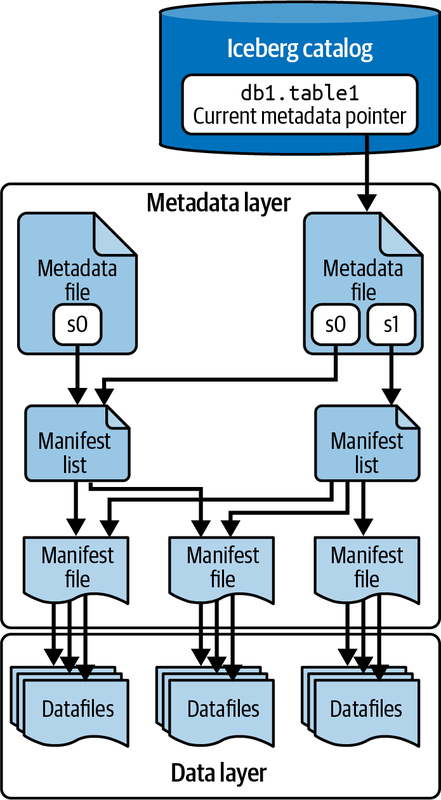
Let's explore each of these layers in detail:
1) Iceberg Catalog
The Iceberg Catalog manages the namespaces and tables, providing a consistent view of the table's metadata. It is responsible for storing and organizing metadata, enabling operations such as listing tables, creating or deleting tables, and tracking table versions. Iceberg supports various catalog implementations like Hive Metastore, AWS Glue, and custom catalogs.
2) Metadata Layer
Beneath the catalog layer is the Metadata Layer, a crucial component that organizes the table's state. It consists of a hierarchical structure:
- Table Metadata Files (or Snapshots): These files store critical information about the table, such as its schema, partitioning information, and snapshots. They also track the history of changes and the current state of the table.
- Manifest Lists: These lists contain pointers to manifest files and include high-level statistics and partition information, enabling efficient data access and filtering.
- Manifest Files: These files list individual data files along with their statistics, such as record counts and column bounds. They enable fine-grained tracking and management of data at the file level.
3) Data Layer
Data Layer is the foundation of Iceberg tables, holding the actual data files. These files can be in formats like Parquet, Avro, or ORC. The data layer is optimized for efficient querying and data management, supporting operations like partitioning, which groups similar rows together to speed up queries.
What Are Snowflake Iceberg Tables?
Snowflake Iceberg tables represent an innovative fusion of Snowflake's powerful cloud data platform with the flexibility and interoperability of the Apache Iceberg table format. In short, Snowflake Iceberg tables are a new kind of table in Snowflake that follows the Apache Iceberg standard, allowing data to be stored in external cloud storage while still leveraging Snowflake's query engine and many of its advanced features.
When you create an Iceberg table in Snowflake, you're essentially telling Snowflake to manage a table whose data resides in external cloud storage (Amazon S3, Google Cloud Storage, or Azure Blob Storage) using the Iceberg format. This approach combines the best of both worlds: the performance and familiar SQL interface of Snowflake with the open format and interoperability of Iceberg.
Here's how Snowflake Iceberg tables work at a high level:
1) Data Storage: The actual data files (typically in Parquet format) are stored in your own cloud storage account, not within Snowflake's managed storage.
2) Metadata Management: Depending on the type of Iceberg table (which we'll discuss later), either Snowflake or an external system manages the Iceberg metadata.
3) Query Execution: When you query an Iceberg table, Snowflake's query engine reads the Iceberg metadata to determine which data files to access, then retrieves and processes those files to generate your results.
4) Write Operations: For Snowflake-managed Iceberg tables, write operations (inserts, updates, deletes) are handled by Snowflake, which updates both the data files in your external storage and the Iceberg metadata accordingly.
5) Access Control: Snowflake's robust security features, including role-based access control, can be applied to Iceberg tables just like any other Snowflake object.
To connect Snowflake to your external storage for Iceberg tables, you use two key Snowflake objects:
- External Volume: This is an account-level object that stores the necessary information for Snowflake to access your external cloud storage.
- Catalog Integration (for externally managed tables): This object defines how Snowflake interacts with an external catalog system (like AWS Glue) for managing Iceberg table metadata.
Benefits of Using Iceberg Tables in Snowflake
Here are the benefits of Iceberg tables in Snowflake:
1) Open Lakehouse Implementation
Apache Iceberg tables allow Snowflake users to implement a lakehouse architecture using open file and table formats. You can store your data in your own cloud storage and still get to use Snowflake’s query engine and features.
2) Interoperability
Since Iceberg tables are an open format, data in Snowflake Iceberg tables can be read and written by other tools that support Iceberg like Apache Spark or Trino. This interoperability means multi-engine workflows and no more data silos.
3) Performance
Snowflake's implementation of Apache Iceberg tables leverages the platform's high-performance query engine and optimizations. For many workloads, Iceberg tables can offer performance comparable to native Snowflake tables, especially for Snowflake-managed Iceberg tables.
4) Data Sharing and Collaboration
Snowflake Iceberg tables make it easier to share and collaborate on data across different platforms and teams. Data scientists using Spark and analysts using Snowflake can work on the same datasets without data duplication or complex ETL.
5) Cost Control
You have more control over storage costs since you’re storing data in your own cloud storage and can potentially optimize them independent of your Snowflake usage.
6) Flexibility
Iceberg tables provide more flexibility in terms of where and how you store your data, allowing you to build data architectures that best suit your organization's needs.
How Snowflake Iceberg Tables Work?
Snowflake Iceberg tables operate by storing data and metadata in external cloud storage (Amazon S3, Google Cloud Storage, or Azure Storage). Snowflake connects to this external storage using an external volume—a Snowflake object that securely manages access. Here’s a brief breakdown of how they work:
- Data Storage: Data and metadata for external Iceberg tables are stored externally, in your cloud storage. Snowflake primarily charges for compute usage and cloud services related to query processing and metadata management (for Snowflake-managed tables), while the customer bears the cost of external storage with their cloud provider.
- External Volume: This is a named Snowflake object that connects to external cloud storage using identity and access management (IAM) credentials. It supports multiple Iceberg tables and securely manages access.
- Iceberg Catalog: Manages table metadata pointers and ensures atomic updates. You can use Snowflake as the catalog or integrate it with an external catalog like AWS Glue.
- Snapshot-Based Model: Iceberg uses snapshots to represent the state of the table at specific points in time, aiding in querying and data recovery.
- Cross-Cloud/Region Support: Supported when using an external catalog for data files (with potential egress costs). Tables using Snowflake as the catalog must reside in the same cloud region as the Snowflake account.
- Billing: Only compute and cloud services are billed by Snowflake. Storage costs are billed directly by the cloud provider.
What Is the Difference Between Snowflake Standard Table and Iceberg Table?
To fully appreciate the unique characteristics of Snowflake Iceberg tables, it's helpful to compare them with Snowflake's standard tables. Here's a detailed comparison:
| Snowflake Standard Table | Snowflake Iceberg Table |
| Data storage location of Snowflake Standard Table is internally managed by Snowflake | Data storage location of Snowflake Iceberg Table is external cloud storage like S3, Blob Storage or GCS |
| Snowflake Standard Table uses a proprietary Snowflake format | Snowflake Iceberg Table uses the Apache Iceberg open table format |
| Metadata for Snowflake Standard Table is managed internally by Snowflake | Metadata can be managed by Snowflake or an external Iceberg catalog |
| Data is stored in a proprietary format optimized for Snowflake | Data in Snowflake Iceberg Table is stored in Parquet files |
| Full data lifecycle management (e.g., compaction, snapshot expiration) is automated by Snowflake | Lifecycle management can be automated by Snowflake or manually managed by the customer |
| Optimized for high performance within Snowflake's infrastructure | Performance is comparable to native tables when managed by Snowflake, potentially lower when using external catalogs |
| Storage costs are included in Snowflake's billing | Storage costs are billed directly by the cloud provider |
| Cross-cloud and cross-region support is limited to Snowflake's infrastructure | Cross-cloud/region support for Snowflake Iceberg Table is available when using an external catalog with potential egress costs |
| Full support for snapshots and time travel with Snowflake's built-in features | Snapshots and Time Travel for Snowflake Iceberg Table are supported with Iceberg’s snapshot-based model |
| Limited interoperability, optimized for use within the Snowflake ecosystem | Data Interoperability for Snowflake Iceberg Table is high, supporting integration with other tools and platforms that use Iceberg |
| Full support for multi-table transactions within Snowflake | Supported when using Snowflake as the catalog |
| Security features for Snowflake Standard Table include native capabilities like dynamic data masking and row-level security | Security features for Snowflake Iceberg Table are supported with Snowflake as the catalog; additional setup may be required for external catalogs |
| Ideal for general-purpose data warehousing | Suitable for big data analytics and scenarios requiring open formats and external storage. |
What Is the Difference Between External Table and Iceberg Table?
Here is a full comparison between Snowflake External Table and Snowflake Iceberg Table:
| Snowflake External Table | Snowflake Iceberg Table |
| Data Storage Location for Snowflake External Table is external cloud storage (Amazon S3, Google Cloud Storage, or Azure) | Data Storage Location for Snowflake Iceberg Table is also external cloud storage supplied by the customer |
| Snowflake External Table references data stored in an external stage, without moving the data into Snowflake | Snowflake Iceberg Table uses the Apache Iceberg format, storing both data and metadata in external cloud storage |
| Metadata Management for Snowflake External Table involves storing file-level metadata within Snowflake | Metadata Management for Snowflake Iceberg Table can be managed by Snowflake or an external Iceberg catalog |
| Snowflake External Table supports querying data in a data lake as if it were in a Snowflake table | Snowflake Iceberg Table combines the performance and query semantics of regular Snowflake tables with external cloud storage |
| Data in Snowflake External Table is accessed and queried directly from the external stage using file paths and metadata | Data in Snowflake Iceberg Table is stored in Parquet files, with metadata and snapshots managed by Iceberg |
| Performance for Snowflake External Table depends on the efficiency of the external data lake and metadata refresh operations | Performance for Snowflake Iceberg Table is optimized when managed by Snowflake, potentially lower with external catalogs |
| Cost for Snowflake External Table includes compute billed by Snowflake and potential storage costs from the cloud provider | Cost for Snowflake Iceberg Table includes compute billed by Snowflake and storage billed by the cloud provider |
| Cross-cloud/region support for Snowflake External Table allows for querying data across different cloud providers and regions | Cross-cloud/region support for Snowflake Iceberg Table is available when using an external catalog with potential egress costs |
| Data Interoperability for Snowflake External Table is designed to integrate with existing data lakes and cloud storage systems | Data Interoperability for Snowflake Iceberg Table supports integration with tools and platforms that use the Iceberg format |
| Use cases for Snowflake External Table include augmenting existing data lakes and running ad-hoc analytics on raw data | Use cases for Snowflake Iceberg Table include big data analytics, regulatory constraints, and leveraging open format |
Types of Snowflake Iceberg Tables
Snowflake supports two main types of Iceberg tables, each with its own characteristics and use cases.
1) Snowflake Managed Iceberg Tables
In Snowflake-managed Iceberg tables, Snowflake handles the table's metadata and lifecycle. These tables offer full Snowflake support, including read and write access, simplified maintenance, and operational tasks managed by Snowflake. They are ideal for users who want the performance and management capabilities of Snowflake.
2) Externally Managed Iceberg Tables
Externally managed Iceberg tables use an external catalog (e.g., AWS Glue) to manage the table's metadata. These tables support interoperability with external catalogs and tools, allowing integration with existing data lakes and external storage solutions. They provide flexibility for organizations using multiple data platforms, but only support read access within Snowflake.
| Features | Snowflake Managed Iceberg Tables | Externally Managed Snowflake Iceberg Tables |
| Read Access | ✔ | ✔ |
| Write Access | ✔ | ❌ |
| Write Access from other Engines | ❌ (Snowflake is single writer) | ✔ |
| Use of Warehouse Cache | ✔ | ✔ |
| Automatic Metadata Refresh | ✔ | ❌ |
| Interoperability | Good | Excellent |
| Nested Datatype Support | ✔ | ✔ |
| Support of Table Clustering | ✔ | ❌ |
| Snowflake Platform Features (Masking, Time Travel, Row-Level Security) | ✔ All features | ❌ Limited (Iceberg Time Travel is supported for reads, but Snowflake-specific features may not be fully integrated) |
Performance Implications of Snowflake Iceberg Tables
Optimized Parquet Scanner:
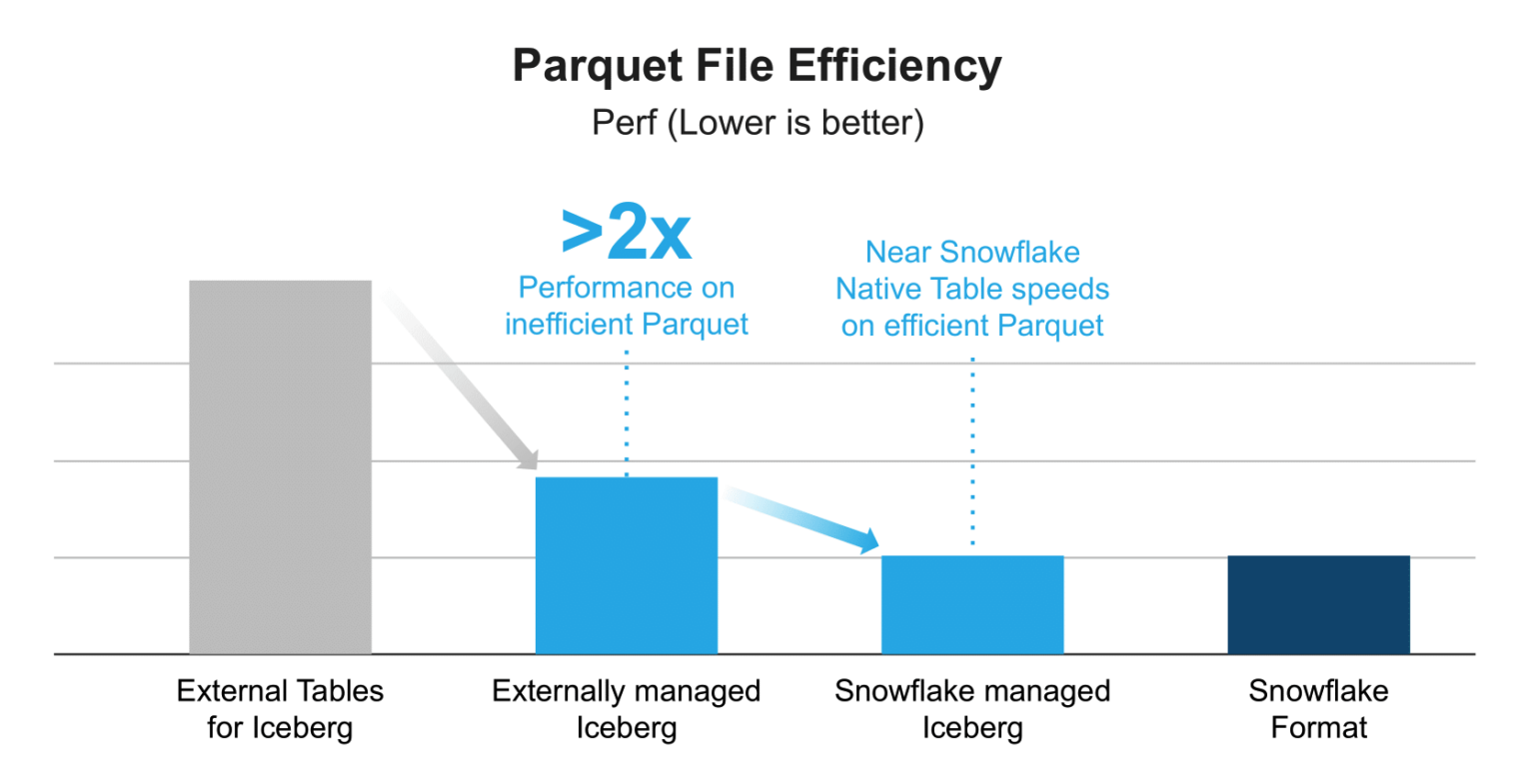
Snowflake's highly optimized Parquet scanner is now used for Iceberg Tables, resulting in a 2x performance improvement over External Tables. This scanner leverages full statistics from both Parquet and Iceberg, enhancing query efficiency.
Local Data Caching:
Iceberg Table data is cached locally on the warehouse, boosting performance for concurrent workloads. This caching is not available with External Tables, giving Iceberg Tables a distinct advantage.
Performance Gap Between Catalog Types:
A performance gap exists between Snowflake-managed and externally managed Iceberg Tables. This gap is primarily due to the efficiency of Parquet file writing. If external engines write Parquet files without full statistics, Snowflake's performance is negatively impacted. Efficient Parquet file handling is crucial for optimal performance in Snowflake-managed Iceberg Tables.
How to Create Iceberg Tables in Snowflake?
Creating Iceberg tables in Snowflake involves using the CREATE ICEBERG TABLE command. Users must specify an external volume and a catalog (either Snowflake or an external one like AWS Glue). The process requires a running warehouse and can be done using SQL commands.
For a more in-depth tutorial, you can check out this YouTube video:
How Iceberg Tables Work In Snowflake
Limitations of Snowflake Iceberg Table
While Snowflake Iceberg tables offer many advantages, it's important to be aware of their current limitations:
1) Availability Region
Snowflake Iceberg tables are available on all cloud platforms and regions except SnowGov regions.
2) Cross-Cloud and Cross-Region Limitations
Cross-cloud and cross-region Snowflake Iceberg tables are supported when using an external catalog. But there are limitations if the active storage location is not in the same cloud provider or region as your Snowflake account.
3) Data Format Support
Snowflake Iceberg tables in Snowflake only support data storage in the Parquet format.
4) Third-Party Client Modifications
Third-party clients cannot modify data in Snowflake Iceberg tables, restricting some integration possibilities.
5) Partitioning Impact on Performance
Certain partitioning methods, such as the bucket transform function, can negatively impact performance for queries with conditional clauses.
6) Time Travel in Spark
Time travel features in Spark are not supported for Snowflake-managed Iceberg tables.
7) Table Types
Only permanent Snowflake Iceberg tables can be created; transient or temporary Snowflake Iceberg tables are not supported.
8) Cloning and Replication
Cloning and replicating Snowflake Iceberg tables are not possible.
9) Write Access with External Catalogs
Externally managed Iceberg tables only support read access in Snowflake. Write access requires converting them to Snowflake-managed tables.
10) Storage Costs
Storage costs for Iceberg tables are billed by the cloud provider, not Snowflake, which can complicate cost management.
11) Row-Level Deletes
The Apache Iceberg specification (V2 and above) supports row-level deletes through delete files. Snowflake supports its own DELETE statements for tables using Snowflake as the catalog.
12) Identity Partition Column Limitations
Identity partition columns (for Snowflake-managed tables) cannot exceed 32 bytes.
13) Metadata Refresh for External Catalogs
Metadata refresh with external catalogs can be less efficient compared to using Snowflake as the catalog.
Best Practices and Optimization Strategies for Snowflake Iceberg Tables
To maximize the performance and cost-efficiency of Snowflake Iceberg tables, it's essential to understand and implement proper optimization strategies.
Table Optimization Features
Snowflake provides several automated optimization features specifically designed for Snowflake-managed Iceberg tables:
➥ Data Compaction
Data compaction combines small files into larger, more efficient files to manage storage, maintain an optimal file size, and improve query performance.
Data compaction feature is automatically enabled for Snowflake-managed Iceberg tables and addresses the "small file problem" that commonly occurs with streaming ingestion or frequent small updates.
Key aspects of data compaction:
- Automatically enabled by default for Snowflake-managed tables
- Can be manually disabled using:
ALTER ICEBERG TABLE table_name SET ENABLE_DATA_COMPACTION = FALSE - Uses bin-packing algorithms to reorganize small data files
- Significantly improves query performance by reducing file open/close overhead
- Should be aligned with metadata refresh schedules for externally managed tables
🔮 Best Practice: Keep data compaction enabled for Snowflake-managed tables to automatically maintain optimal file sizes and prevent the small file problem from degrading query performance.
➥ Manifest Compaction
Manifest compaction optimizes the metadata layer by reorganizing and combining smaller manifest files. This compaction reduces metadata overhead and improves query performance.
Manifest Compaction feature is enabled automatically and you can't disable it.
Manifest compaction is crucial because:
- It reduces the number of metadata files that need to be read during query planning
- Improves scan planning performance, especially for tables with long histories
- Automatically runs in the background without user intervention
- Helps maintain optimal metadata structure over time
🔮 Best Practice: Rely on automatic manifest compaction for Snowflake-managed tables, and ensure your metadata refresh frequency for externally managed tables allows compaction to keep pace with write operations.
➥ Automatic Clustering
Automatic Clustering reorganizes data within files or partitions based on frequently queried columns. While this feature is billed separately as a standalone service, it can dramatically improve query performance for large tables.
Implementation considerations:
- Define clustering keys using
CLUSTER BYparameter during table creation or withALTER TABLE - Choose clustering columns based on frequently filtered or joined columns
- The file size for clustered Iceberg tables is based on the clustering configuration unless you override it with
TARGET_FILE_SIZE - Monitor clustering effectiveness using Snowflake's clustering information functions
🔮 Best Practice: Implement automatic clustering on columns that are frequently used in WHERE clauses, JOIN conditions, or GROUP BY operations. Monitor clustering metrics to ensure the cost-benefit ratio justifies the additional expense.
Storage Serialization Policy
The storage serialization policy specifies the type of encoding and compression that Snowflake uses for table data files. This is a critical decision that cannot be changed after table creation.
There are two available options:
COMPATIBLE: Snowflake performs encoding and compression that ensures interoperability with third-party compute engines such as Spark, Trino, or Presto. This policy is ideal when:
- Multiple compute engines need to read/write the same Iceberg table
- You prioritize data portability over maximum Snowflake performance
- External engines will query the data frequently
OPTIMIZED: Provides the best performance within Snowflake by using Snowflake-specific optimizations, but may reduce compatibility with external engines. This policy is recommended when:
- Snowflake is the primary or exclusive query engine
- Maximum query performance is the priority
- External engine compatibility is not a concern
The serialization policy must be specified at table creation and cannot be modified later. If not specified, the table inherits the value from the schema, database, or account level.
🔮 Best Practice: Choose OPTIMIZED serialization policy if Snowflake is your primary query engine for maximum performance. Only use COMPATIBLE if you have confirmed requirements for external engine access. Since this cannot be changed later, carefully evaluate your multi-engine strategy before table creation.
Target File Size Configuration
To improve query performance for external Iceberg engines such as Spark or Trino, you can configure a target file size for both Snowflake-managed and externally managed Iceberg tables.
Available options:
AUTO(default): Snowflake automatically determines optimal file size16MB,32MB,64MB,128MB: Fixed file sizes
Example:
CREATE ICEBERG TABLE my_iceberg_table (col1 INT)
  CATALOG = 'SNOWFLAKE'
  EXTERNAL_VOLUME = 'my_external_volume'
  BASE_LOCATION = 'my_iceberg_table'
  TARGET_FILE_SIZE = '128MB';
Larger file sizes generally provide better performance for scan-heavy analytical queries, while smaller files may be more appropriate for selective point queries or when using external engines with different optimization characteristics.
🔮 Best Practice: Use the default AUTO setting for Snowflake-managed tables unless you have specific external engine requirements. For tables accessed by Spark or Trino, test with 128MB or 64MB file sizes to optimize for their query patterns.
External Volume Configuration
Each external volume is associated with a particular Active storage location, and a single external volume can support multiple Iceberg tables. However, the number of external volumes you need depends on how you want to store, organize, and secure your table data.
🔮 Best practices for external volumes:
- Use one external volume if you want all table data and metadata in subdirectories under the same storage location (e.g., the same S3 bucket)
- Create separate external volumes to:
- Apply different security policies to different table groups
- Separate read-only volumes for externally managed tables from read-write volumes for Snowflake-managed tables
- Organize tables by department, environment (dev/staging/prod), or data sensitivity level
- Configure IAM permissions appropriately:
- Read-only permissions for externally managed tables
- Full read/write permissions for Snowflake-managed tables
Metadata Optimization for Externally Managed Tables
To optimize query runtime performance for tables that aren't managed by Snowflake, make sure your Parquet file statistics are as complete as possible. Also, make sure that the Parquet file writer you use (for example, Spark or Trino) is configured to write statistics.
🔮 Best practices:
- External engines should write full column-level statistics (min/max values, null counts, row counts) to Parquet files
- Configure Spark, Trino, or other engines to enable statistics writing
- Perform frequent refreshes on Iceberg tables that use an external catalog to keep metadata current and prevent long refresh times
Table Maintenance Operations
For externally managed tables, regular maintenance is essential:
Row-Level Delete Management
Snowflake supports position deletes only. For the best read performance when you use row-level deletes, perform regular compaction and table maintenance to remove old delete files.
Position delete considerations:
- Position deletes create separate delete files that mark rows as deleted
- Accumulation of delete files degrades read performance
- Regular compaction merges delete files back into data files
- Excessive position deletes, especially dangling position deletes, might prevent table creation and refresh operations
Maintenance commands for external engines:
- Spark: Use
rewrite_data_filesprocedure withdelete-file-thresholdoption - Regular compaction schedules prevent delete file accumulation
- Monitor delete file counts and implement automated maintenance
🔮 Best Practice: For externally managed tables with frequent DELETE operations, establish a regular compaction schedule (daily or weekly depending on delete volume) to prevent accumulation of position delete files that degrade read performance.
Snapshot Expiration
Snapshots accumulate over time as the table changes. For Snowflake-managed tables:
- Snowflake automatically manages snapshot lifecycle based on
DATA_RETENTION_TIME_IN_DAYS - Old metadata, manifest lists, and manifest files are deleted automatically
- Deletion occurs 7-14 days after snapshot expiration
For externally managed tables:
- Snapshot management must be handled by the external catalog or engine
- Snowflake uses
DATA_RETENTION_TIME_IN_DAYSonly for Time Travel and undrop operations - External metadata is not deleted by Snowflake when retention periods expire
🔮 Best Practice: For externally managed tables, coordinate snapshot expiration policies between Snowflake's DATA_RETENTION_TIME_IN_DAYS and your external catalog's retention settings to ensure consistent Time Travel capabilities and prevent unnecessary metadata accumulation.
Performance Monitoring
Query Performance Monitoring:
SELECT
  query_text,
  execution_time,
  bytes_scanned,
  warehouse_name
FROM snowflake.account_usage.query_history
WHERE query_text ILIKE '%my_iceberg_table%'
ORDER BY start_time DESC;
Storage Metrics:
Monitor storage usage using:
TABLE_STORAGE_METRICSview in ACCOUNT_USAGE schema- Compare with cloud provider storage metrics to identify orphan files
- If you see a mismatch, contact Snowflake Support for assistance with determining whether you have orphan files and removing them
🔮 Best Practice: Implement regular monitoring of query performance metrics and storage usage. Set up alerts for performance degradation or unexpected storage growth, and establish a monthly review process to identify optimization opportunities.
Warehouse Sizing for Table Operations
Scanning a large number of data files can slow down table creation. To accelerate the table creation process, use a larger warehouse that can scan table files in parallel.
Important limitation: Snowflake doesn't parallelize table column scanning. Switching to a larger warehouse doesn't result in faster query runtime for column-level operations.
Warehouse sizing guidelines:
- Use larger warehouses (L, XL) for initial table creation with many data files
- Use larger warehouses for operations that scan multiple manifest files
- Standard warehouses are typically sufficient for ongoing query operations
- Size warehouses based on data volume and concurrency requirements, not just Iceberg-specific needs
🔮 Best Practice: Use larger warehouses (L or XL) for initial table creation or major restructuring operations involving many data files, but revert to appropriately-sized warehouses for routine query operations to optimize costs.
Partitioning Strategy
Design effective partitioning strategies based on query patterns:
Partition transform functions:
- Identity (
col_name): Direct column values as partitions - YEAR, MONTH, DAY, HOUR: Time-based partitioning for temporal data
- TRUNCATE: String prefix partitioning
- BUCKET: Hash-based distribution for even data distribution
Partitioning considerations:
- Avoid over-partitioning (too many small partitions)
- Align partitions with common filter predicates
- Certain partitioning methods, such as the bucket transform function, can negatively impact performance for queries with conditional clauses
- Iceberg's hidden partitioning automatically handles partition pruning
🔮 Best Practice: Partition on columns that are frequently used in WHERE clauses, typically date/time columns for time-series data. Avoid creating more than a few thousand partitions, and test query performance with your actual workload patterns before finalizing the partitioning strategy.
Data Retention and Time Travel
Configure appropriate retention periods:
For Snowflake-managed tables:
- Set
DATA_RETENTION_TIME_IN_DAYSat account, database, schema, or table level - Default is typically 1 day; Enterprise Edition supports up to 90 days
- Snowflake automatically manages snapshot lifecycle within retention period
- When you drop a table, you can use the UNDROP ICEBERG TABLE command to restore it within the data retention period
For externally managed tables:
- Snowflake uses
DATA_RETENTION_TIME_IN_DAYSfor Time Travel and undrop only - External catalog manages actual snapshot retention
- Coordinate Snowflake settings with external catalog configuration
🔮 Best Practice: Set DATA_RETENTION_TIME_IN_DAYS based on your actual Time Travel requirements and regulatory needs, balancing the benefits of historical queries against storage costs. Most organizations find 7-14 days sufficient for operational recovery scenarios.
Cost Optimization Strategies
🔮 Storage Cost Management:
- Storage costs are billed by cloud provider, not Snowflake
- Implement lifecycle policies in cloud storage for old snapshots
- Regular compaction reduces storage footprint
- Monitor and remove orphan files
🔮 Compute Cost Management:
- Snowflake bills only for compute and cloud services
- Right-size warehouses for workload requirements
- Use appropriate clustering to reduce data scanning
- Enable result caching where appropriate
🔮 Cross-Region Data Transfer:
- Minimize cross-cloud/cross-region queries when possible
- If a Snowflake-managed Iceberg table is cross-cloud/cross-region, Snowflake bills your cross-region data transfer usage under the TRANSFER_TYPE of DATA_LAKE
- For Snowflake-managed tables, keep external volumes in the same region as your Snowflake account
TL;DR:
- Enable automatic optimization features for Snowflake-managed tables (compaction, manifest compaction)
- Choose the appropriate storage serialization policy based on your multi-engine requirements
- Configure target file sizes optimally for your workload patterns
- Ensure complete Parquet statistics when using external writers
- Implement regular maintenance for externally managed tables
- Monitor query performance and adjust clustering/partitioning strategies
- Align metadata refresh schedules with table maintenance operations
- Right-size warehouses for table operations and queries
- Configure appropriate data retention periods balancing Time Travel needs with storage costs
- Monitor cross-region data transfer to optimize costs

Want to take Chaos Genius for a spin?
It takes less than 5 minutes.

Conclusion
And that’s a wrap! Snowflake Iceberg tables are a significant advancement in data management, combining the power of Apache Iceberg with the performance and simplicity of Snowflake. They offer a flexible, high-performing way to manage big data, allowing organizations to benefit from the best of both data lakes and data warehouses. There are some caveats, but the benefits of Snowflake Iceberg tables are worth it for modern data-driven companies.
In this article, we have covered:
- What is Apache Iceberg?
- Core Architecture of Apache Iceberg
- What Are Snowflake Iceberg Tables?
- What Is the Difference Between Snowflake Standard Table and Iceberg Table?
- What Is the Difference Between External Table and Iceberg Table?
- Types of Snowflake Iceberg Tables
- Snowflake Iceberg Table Performance
- How to Create Iceberg Tables in Snowflake?
- Limitations of Snowflake Iceberg Table
- Best Practices and Optimization Strategies for Snowflake Iceberg Tables
… and so much more!
FAQs
What is Apache Iceberg?
Apache Iceberg is an open source, high-performance table format for managing large analytic datasets in distributed file systems or object storage.
What are Snowflake Iceberg tables?
Snowflake Iceberg tables are a type of table in Snowflake that use the Apache Iceberg format, storing data externally in cloud object storage while allowing Snowflake to manage and query the data.
What are the benefits of using Iceberg tables in Snowflake?
Benefits include open lakehouse implementation, enhanced interoperability with other engines, potentially comparable performance to native tables (especially for Snowflake-managed), improved data sharing, and more granular cost control over storage.
How do Snowflake Iceberg tables differ from Snowflake native tables?
Snowflake Iceberg tables store data externally and use either Snowflake or an external catalog for metadata management, while native tables store data and metadata within Snowflake.
What is the difference between Snowflake-managed and externally managed Iceberg tables?
Snowflake-managed tables have their metadata managed by Snowflake and support full read/write access from Snowflake (Snowflake being the single writer). Externally managed tables use an external catalog for metadata and only support read access within Snowflake.
Can Snowflake Iceberg tables support cross-cloud or cross-region data?
Yes, cross-cloud and cross-region support is available when using an external catalog for metadata management. But, for Snowflake-managed Iceberg tables, the external volume must be in the same cloud and region as the Snowflake account.
What data formats are supported by Snowflake Iceberg tables?
Currently, Snowflake Iceberg tables only support the Parquet data format.
Can third-party clients modify data in Snowflake Iceberg tables?
For Snowflake-managed Iceberg tables, third-party clients cannot directly modify the data as Snowflake is the single writer. However, for externally managed Iceberg tables, other engines can perform write operations via their own catalogs.
Are temporary or transient Snowflake Iceberg tables supported?
No, only permanent Snowflake Iceberg tables can be created.
How are storage costs handled for Snowflake Iceberg tables?
Storage costs for Iceberg tables are billed by the cloud provider, not Snowflake.
Does Snowflake support row-level deletes for Iceberg tables?
The Apache Iceberg specification (V2 and above) supports row-level deletes. Snowflake supports its own DELETE statements for tables using Snowflake as the catalog, leveraging Iceberg's capabilities.